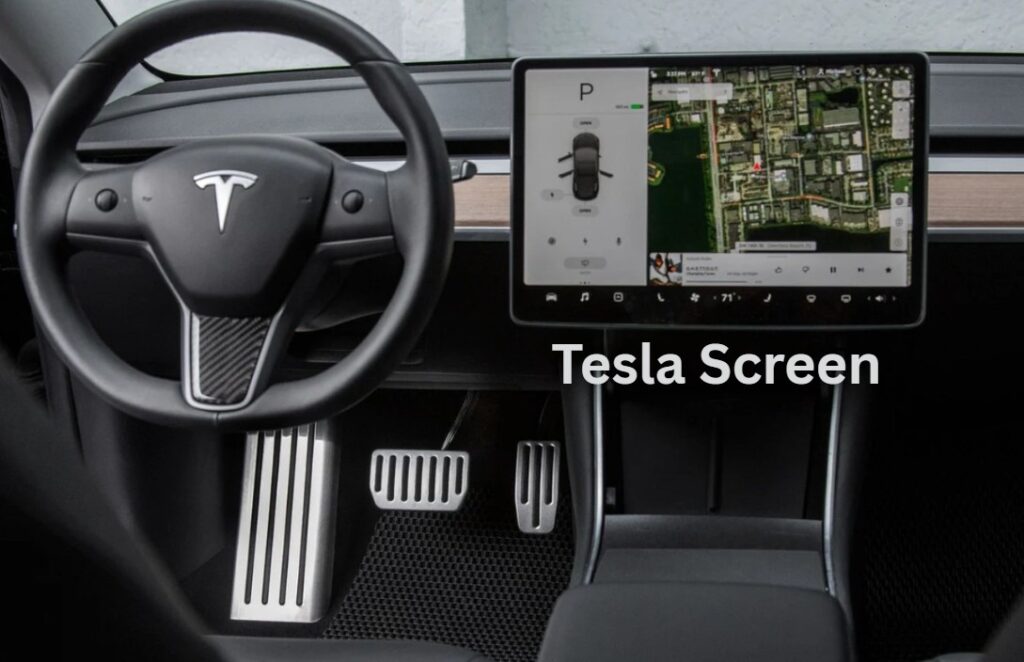
Tesla Screen
The Tesla screen is more than just a digital display—it’s the central nervous system of the most advanced electric vehicles on the market today. From controlling climate and navigation to entertainment and autonomous driving features, this signature touchscreen interface is an essential part of what makes Tesla vehicles so unique and futuristic. Whether you’re a Tesla owner, prospective buyer, or tech enthusiast, understanding the Tesla screen can enhance your driving experience and deepen your appreciation for how Tesla is revolutionizing the auto industry.
In this comprehensive guide, we explore every aspect of the Tesla screen: its design, functionality, software updates, common issues, troubleshooting tips, and what the future holds. With expert-backed insights and up-to-date research, this article is your definitive resource on Tesla’s game-changing display system.
The Evolution of the Tesla Screen
Tesla’s screen technology has evolved significantly since the launch of the original Model S in 2012. That first iteration featured a 17-inch vertical touchscreen—a bold move at the time, replacing most traditional dashboard buttons. It was more than a user interface; it marked a philosophical shift in vehicle design, placing software and digital control at the center of the driver experience.
In later models, including the Model 3 and Model Y, Tesla transitioned to a 15-inch horizontal touchscreen, more suited for both driver and passenger interaction. The Model X and newer Model S have also adopted horizontal displays, now complemented by rear screens in some trims for passenger entertainment.
The consistent refinement of Tesla’s screen layout and functionality illustrates the company’s commitment to a software-first approach. Unlike most carmakers who rely on third-party infotainment systems, Tesla develops its own software in-house, allowing for seamless integration with the vehicle’s hardware and a continuously improving user experience via over-the-air updates.
Tesla Screen Features That Set It Apart
The Tesla screen isn’t just about aesthetics—it’s the command center for nearly every vehicle function. From the dashboard to the entertainment system, here’s a detailed look at the core capabilities that make the Tesla screen a standout in the automotive world.
Navigation and Maps
Tesla’s real-time navigation system is powered by Google Maps and enriched with Tesla-specific routing data. The screen displays high-resolution maps with real-time traffic, route optimization, and Supercharger station locations, helping drivers plan long trips with minimal downtime.
Autopilot and Full Self-Driving Visualizations
One of the most futuristic aspects of the Tesla screen is its ability to show visualizations of the environment around the car. When Autopilot or Full Self-Driving (FSD) is activated, the screen displays nearby vehicles, lane markings, pedestrians, cyclists, and traffic signals in real-time. This level of visual feedback builds trust and situational awareness for the driver.
Climate Control
Tesla’s climate control system is entirely screen-based. Users can adjust cabin temperature, seat heaters, and even control air flow direction using intuitive touchscreen controls. The “Dog Mode” and “Camp Mode” features—also managed through the screen—further demonstrate Tesla’s user-centric design philosophy.
Entertainment and Apps
The Tesla screen doubles as an entertainment hub. With access to streaming platforms like Netflix, YouTube, and Spotify, as well as video games via Tesla Arcade, the infotainment experience rivals modern tablets. This is particularly useful during charging stops, where downtime becomes a chance to relax.
Vehicle Settings and Customization
Everything from regenerative braking strength to light settings, driving profiles, and Autopilot configurations are managed through the Tesla touchscreen. This software-first approach means drivers can personalize their experience in granular detail.
Tesla Screen Software: Over-the-Air Updates and UI Enhancements
A key advantage of the Tesla screen is its connection to the cloud. Tesla frequently rolls out over-the-air (OTA) software updates, adding new features, improving performance, and enhancing user interfaces without the need to visit a dealership.
Major updates often include redesigned UI layouts, improved energy consumption displays, new entertainment options, and even seasonal Easter eggs like “Light Show Mode.” These updates keep older vehicles feeling fresh and up-to-date, something very few automakers offer at this scale.
The interface design is clean and intuitive, with a focus on minimalism. While early users reported some learning curve with the all-touch control system, many now praise the interface for being responsive, modern, and frequently improved.
Troubleshooting Common Tesla Screen Issues
Like any technology, Tesla’s touchscreen isn’t immune to problems. While most users enjoy a seamless experience, some owners have reported issues ranging from screen freezing to yellow borders or even complete blackouts. Understanding the root of these problems and knowing how to fix or prevent them is key.
Screen Freezing or Unresponsiveness
A common concern is the screen becoming temporarily unresponsive. This usually happens due to a software glitch. Fortunately, Tesla allows for a soft reset by holding down both scroll wheels on the steering wheel until the screen reboots. This can resolve most minor bugs.
Yellow Border or Discoloration
Some older Model S and Model X units experienced a yellow border around the screen caused by adhesive breakdown. Tesla acknowledged the issue and has offered fixes, including a UV light treatment method. This issue is much rarer in newer models thanks to improved manufacturing techniques.
MCU Failure
The Media Control Unit (MCU) is the hardware that powers the screen and infotainment system. In earlier vehicles (pre-2018), the eMMC flash memory in the MCU1 was prone to failure due to excessive data logging. Tesla has since upgraded to MCU2 and offers retrofit options for those affected. Owners concerned about MCU longevity should consider upgrading to the newer hardware for better performance and compatibility.
Tesla Screen Customization and Aftermarket Upgrades
While Tesla’s built-in system is highly capable, some owners seek additional customization through aftermarket Tesla screen upgrades or accessories. Popular modifications include screen protectors, matte finish overlays to reduce glare, or rear entertainment screen add-ons for Model 3 and Model Y.
Some companies even offer screen swiveling kits, allowing users to angle the display toward the driver or passenger for better viewing. It’s worth noting that modifying your Tesla’s screen setup could affect your warranty, so it’s important to consult Tesla’s official guidelines or have upgrades performed by a certified technician.
Tesla Screen vs. Other Infotainment Systems
When compared with traditional automakers’ infotainment systems, Tesla’s approach stands out for several reasons:
- Tesla doesn’t support Apple CarPlay or Android Auto, opting instead for a native OS with tightly integrated services.
- Most vehicles require dealer visits for software updates, whereas Tesla delivers OTA updates wirelessly and frequently.
- The responsiveness, screen size, and minimalist design are generally considered more modern and user-friendly than most other OEM systems.
Brands like Mercedes-Benz and BMW have stepped up their digital interfaces, but Tesla still leads the industry in terms of real-time software evolution, driver interaction, and clean, distraction-free interfaces.
How the Tesla Screen Supports Safety and Driving Efficiency
The Tesla screen isn’t just about convenience—it also plays a vital role in vehicle safety and efficiency. The screen offers lane guidance, energy consumption data, tire pressure monitoring, and collision warnings. In FSD Beta environments, the visualizer helps drivers understand how the car interprets its surroundings, boosting user confidence.
Even basic features like blind spot visualization (which uses camera feeds on the display when signaling) offer a substantial safety boost compared to traditional mirror-only systems. With frequent enhancements through software updates, Tesla continues to push the screen’s role in proactive driving assistance.
Future of Tesla Screens: What’s Next?
Elon Musk has hinted at a future where Tesla vehicles become more autonomous and entertainment-focused. As that vision comes to life, expect Tesla screens to evolve into full-blown multimedia centers. Possibilities include:
- Larger, more immersive screens
- Enhanced passenger displays for gaming, media, and productivity
- Integration with AI assistants and advanced gesture control
- Augmented reality heads-up displays (HUDs)
These upgrades will further blur the lines between a vehicle and a digital living space. Tesla is already testing full Steam gaming compatibility in newer models, and partnerships with major content platforms are likely to grow.
Conclusion: The Tesla Screen Is the Future of Vehicle Interfaces
The Tesla screen is not just an infotainment tool—it’s a core element of Tesla’s DNA. From enabling safer driving and reducing physical controls to offering rich entertainment and real-time vehicle diagnostics, it encapsulates the spirit of a software-defined vehicle. While not without occasional issues, Tesla’s ongoing updates, in-house engineering, and commitment to user experience make this screen one of the most innovative elements in automotive design today.
Whether you’re learning the basics or seeking expert tips, understanding how the Tesla screen works—and how to make the most of it—can elevate your EV experience. As vehicles become smarter and more connected, Tesla continues to lead the charge with a digital-first approach that’s defining the future of mobility.
FAQs About the Tesla Screen
Can I use Apple CarPlay or Android Auto with a Tesla screen?
No. Tesla uses its own proprietary system and does not support third-party smartphone mirroring platforms.
How do I reset a frozen Tesla screen?
Hold down both scroll wheels on the steering wheel until the screen restarts.
Is it possible to upgrade an older Tesla screen to the new version?
Yes. Tesla offers MCU upgrades for certain models, allowing users to benefit from improved speed and functionality.
Do all Tesla models have the same screen?
No. While they share similar software, screen size and orientation differ between models (e.g., vertical in older Model S/X vs. horizontal in Model 3/Y).
Can the Tesla screen be repaired if damaged?
Yes, but repairs should be done by Tesla-certified service centers to avoid voiding the warranty.
About The Author